This is a useful tool for people to check the status of a commercial flight using the tail number of the airplane, without the need to subscribe to any services. As a passenger, this is useful because you can see where the airplane scheduled to fly you is currently, which can help keep track of delays and cancellations.
The first step is to find the tail number of the flight that you are scheduled to take. Head to the airports page of flightradar24 and get to the page of the airport that you will be flying out of. For example, if you are flying out of Oakland, California, this would be https://www.flightradar24.com/data/airports/oak. On that page, click the "Departures" tab. This will give a list of flights, along with their tail numbers.
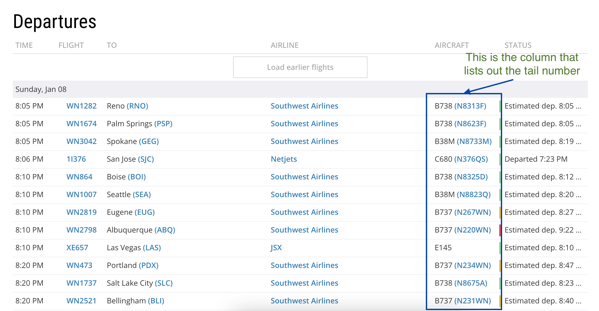
For example, assuming that you are flying on the 8:05 PM Southwest flight to Reno (WN1282), the tail number is under the "Aircraft" column (N8313F).
Once you have the tail number, you can use flightaware.com to track the schedule, current location, flight path. Just put the tail number into the search box. Another useful tool is airfleets.com, which can show complete airplane details, as well as links to adsbexchange.
this project, indieserials platform
Curious to see where the series goes next.
Great breakdown! I noticed some of those details you mentioned,
especially in the second episode. Always enjoy reading your perspective.
This piece offers great insight. The perspective on the character arc adds a lot.
Definitely bookmarking this for reference.
Appreciate the thoughtfulness here. The connections you drew between scenes
took me by surprise. Really enriches the viewing experience.
I've been following this series and your take adds so much.
The attention to detail you offer makes the experience richer.
Keep up the great work.
london77s
then to register or join it as typically it's going to turn up an enormous draw back with these online gaming sites.
london77
the duty yourself, but found that the installation is more concerned than you
anticipated, it is a good apply to call a specialist.
london77s
be able to virtually on daily basis people come collectively to register, so that's
why the association of gamers is alleged every day.